DRKIST Attendance Tracker
Last Updated:
In 30 Seconds
DRKIST Attendance Tracker is a web-based attendance system I built for students and faculty at my college.
It makes it easier for students to check their attendance without searching through Excel sheets. Faculty can upload the attendance Excel sheet they already use, and the system processes it and updates the students’ attendance data.
I built it using Next.js and Supabase, with separate dashboards for students, faculty, and administrators.
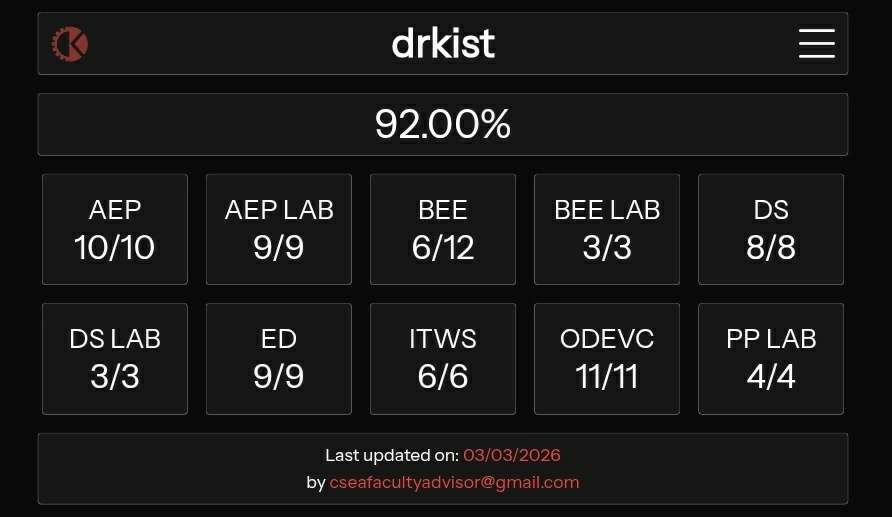
Screenshot
Spark
Our college used to share attendance data through Excel sheets in our class WhatsApp groups. The faculty advisor would send a sheet containing the students’ IDs, names, subjects, classes attended, and attendance percentages.
For me, checking my own attendance in that sheet was frustrating. I had to open the Excel file, zoom in, find my ID, and scroll across the sheet to find the attendance percentage I wanted to check.
I thought, why can’t we have something where I can just log in and see my attendance?
That was the whole idea behind this project. I wanted to make checking attendance as simple as possible for students, without creating extra work for the faculty advisors.
The faculty advisors could continue using the same Excel sheets they were already using. Instead of sharing them in the WhatsApp group, they could upload them to the website, and the system would process the Excel file and display the attendance data in a much cleaner way.
Vision
I wanted the system to be as simple as possible for both students and faculty.
A student or faculty member would first create an account using their email address. The system already has the details of the students and faculty, including their names and email addresses, so only registered users can create an account.
After signing in, users are taken to a dashboard based on their role.
Students can immediately see their overall attendance along with subject-wise details, including the number of classes held, classes attended, and their attendance percentage.
Faculty advisors have a different dashboard where they can upload the same Excel attendance sheet they were already using. The system processes the file, updates the attendance records, and the updated data becomes available to the students.
There is also an administrator who manages the registered students and faculty.
My goal was to keep the process simple: students shouldn’t have to search through Excel sheets, and faculty shouldn’t have to change the way they maintain attendance.
Journey
This was my first time using Next.js, Tailwind CSS, TypeScript, and Supabase. I had already worked with HTML, CSS, and JavaScript, and I had used Firebase for authentication, database, and storage while building DuoMash. But this was my first time using this particular stack.
I didn’t follow a YouTube tutorial to build this project. Instead, I learned while building it, using ChatGPT and the documentation of the technologies I was working with.
I would describe how I wanted the system to work, including the architecture, logic, and different parts of the application, and then use ChatGPT to understand how I could implement those ideas. I didn’t simply give the whole project to ChatGPT. When I got code from it, I would ask questions about why I was doing something and what each part of the code was supposed to do.
I started with the authentication system and built the sign-up and sign-in pages. I wanted the system to identify whether a user was a student, faculty member, or administrator, so I created separate tables for those roles. Based on the user’s email address, the system would determine their role and take them to the corresponding dashboard.
After that, I built the administrator dashboard. From there, I could manage the student and faculty data used by the system. I used the student information available through the attendance data shared by the college to populate and test the system.
Then I built the faculty dashboard and the Excel upload process. Faculty could upload the attendance sheet, and the system would process the data and update the database. I could then log in as a student and see how my attendance appeared in the dashboard.
There were many errors along the way. At several points, I didn’t completely understand what I was building. I used ChatGPT to help me debug and understand those problems, but I tried not to blindly follow the answers. I kept asking why something was being done and what a particular piece of code was responsible for.
By the time I finished the project, I had become much more familiar with Next.js, Supabase, Tailwind CSS, TypeScript, and SQL. I learned these technologies by actually using them instead of learning them separately and then trying to build something.
That was the main journey of this project for me: I was learning the stack while building the system.
Challenges
The biggest challenge was that I was learning the technologies while building the project. Next.js, Supabase, Tailwind CSS, TypeScript, and SQL were all things I was still getting familiar with, so I made a lot of mistakes along the way.
I was also building everything on my phone using Termux. Setting up the development environment itself had some limitations. The latest versions of Next.js and its dependencies didn’t work properly in my Termux environment, so I had to work with older versions.
Because I was new to the technologies, I ran into many errors during development. Authentication was one area where I faced problems while testing the application. Since I was repeatedly creating accounts and signing in while developing, I also encountered rate-limit errors.
I didn’t have major problems designing the database. I already had the Excel attendance data used by the college, so I could look at the structure of that data and design the database around how I wanted the system to work.
For me, the real challenge wasn’t one particular feature. It was bringing together technologies I had never used before and figuring things out as I went.
What I Learned
Before this project, I was mainly comfortable with HTML, CSS, and JavaScript. I had already worked with Firebase while building DuoMash, so concepts like authentication, databases, and backend services were not completely new to me.
For DRKIST Attendance Tracker, I wanted to try a more structured approach, so I decided to use Next.js. This was my first time working with Next.js, Supabase, Tailwind CSS, TypeScript, and SQL.
I learned these technologies while building the project instead of studying each one separately first. I used ChatGPT along with the documentation of the technologies I was using. When I got stuck, I would read the documentation and sometimes take a piece of it and ask ChatGPT to explain what it meant in simpler terms. Then I would use that understanding while writing and debugging the code.
Since I had already worked with Firebase, I had some understanding of how authentication and databases worked. But DRKIST Attendance Tracker had a different type of data and a more structured set of requirements, so I had to think differently about how the database should be designed and how the data should flow through the application.
By the end of the project, I had a much better understanding of how Next.js, Supabase, Tailwind CSS, TypeScript, and SQL work together. I also understood more about structuring a larger application, designing a database around the requirements, handling different user roles, and connecting the different parts of the system.
I may not remember every piece of syntax, but I understand what the different parts of the program are doing and why they are there.
Looking Back
I consider the project finished, although it could still need some updates.
I was happy when I saw the system working and students being able to use it. This was also the first time I had built something that people around me were actually using, which made the project feel different from the smaller projects I had built before.
But I wasn’t completely satisfied with the way attendance was being recorded. The system made the Excel-based process easier, but it didn’t really remove the original manual process. Faculty still had to maintain attendance in their register books, enter it into an Excel sheet, and then upload that sheet to the website.
I started thinking: why use the register book and then create an Excel sheet at all?
In a future version, I would like faculty to record attendance directly through the web app. The system could use the timetable and the classes assigned to each faculty member to show the appropriate students. Faculty could then mark each student as present or absent, and the attendance would be updated directly in the database.
Building this project changed the way I think about software. I started looking beyond whether a feature works and thinking about whether the system actually improves the process around it.
Most importantly, I really enjoyed seeing people around me use something I had built. My earlier projects were mostly things I built for myself, but this one had real users. That made the project much more meaningful to me.